
Stop rebuilding the commission spreadsheet every month.
Import CSV, apply your rules, review changes, export payouts — audit trail included.
No credit card · Ready in 5 min · CSV-first
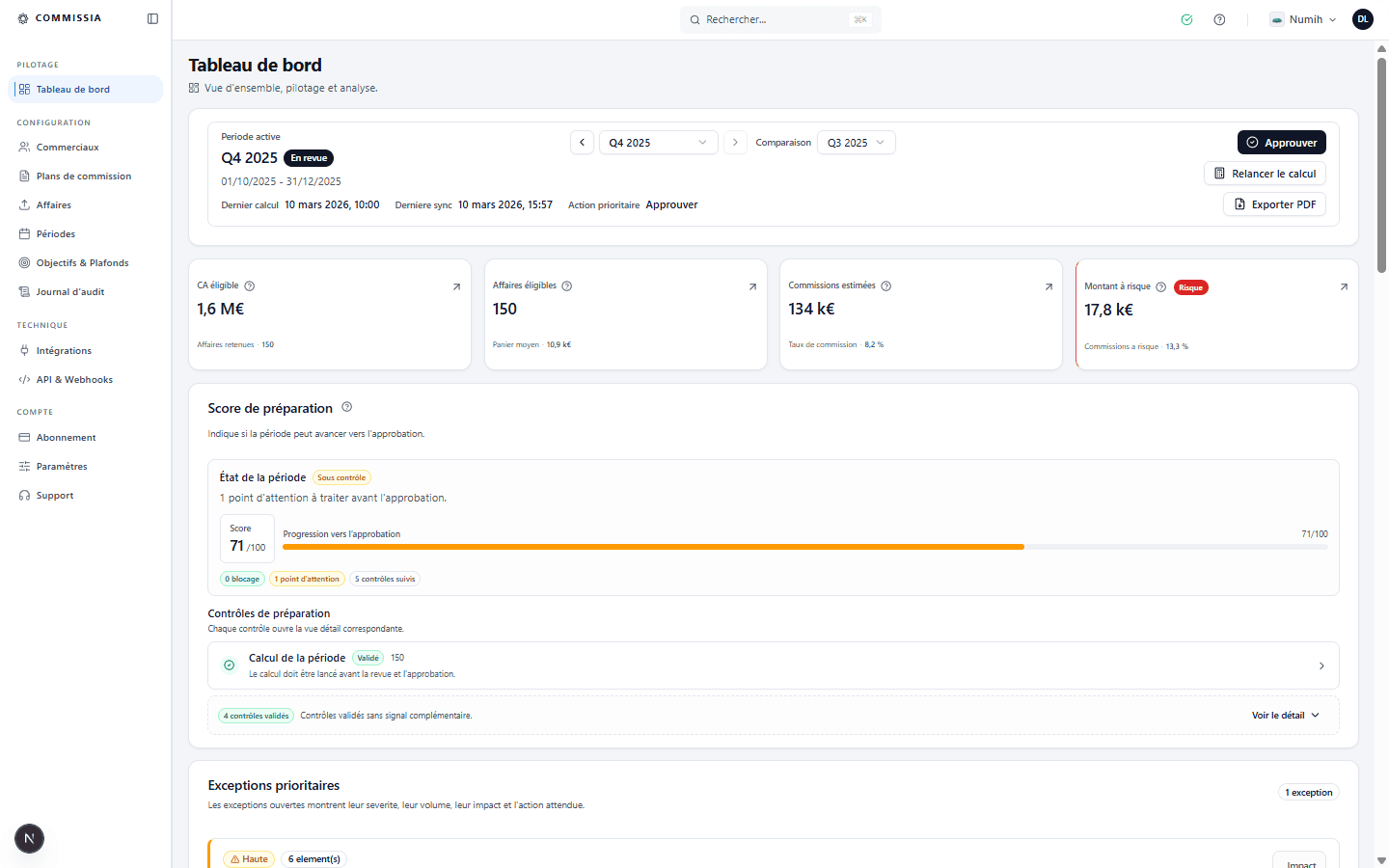
Monthly cycle
From import to export, without leaving Commissia.
- 1Import or sync deals
- 2Calculate then validate the period
- 3Export a clear, pay-ready result (CSV/PDF)
Validation cycle
One cycle, one source of truth
Close time
< 30 min
from deal file to a period ready for review
Traceability
100%
deal, rule, result and export stay linked
Rules handled
5 types
flat, percentage, tiered, accelerator and bonus
Review
4 statuses
draft → review → approved → paid
In use with early teams
We finally have a readable close: rules, statuses and export in one place.
Sales Lead (SMB 10–30)
Design partnerFewer back-and-forths on 'why this amount': the rule and the deal are traceable.
Ops / Finance (SMB)
BetaCSV is enough to get started, and period validation prevents makeshift exports.
Sales Ops (SMB)
Early userSpreadsheets break at close time.
As rules and exceptions pile up, closing becomes a manual reconciliation.
Typical signals
- Close takes 1–2 days of back-and-forth.
- Hard to justify 'why this payout' to reps.
- Each new rule makes the sheet fragile.
A monthly close under control
Same source, same logic and same period status to calculate, review and pay.
Monthly close
Excel / Sheets
1–2 days of consolidation and back-and-forth.
Commissia
One rerunnable cycle: calculate, review, export.
Impact
Less blocked timeExplaining an amount
Excel / Sheets
Searching across tabs, formulas and comments.
Commissia
Deal, rule and amount visible in one place.
Impact
Fewer disputesPlan changes
Excel / Sheets
Each new edge case makes the file more fragile.
Commissia
Rules live in the engine with quotas, tiers and caps.
Impact
More reliableFinance validation
Excel / Sheets
Exports are stitched together at the end.
Commissia
Review, approve, then export from the period.
Impact
Cleaner payoutOperational benefit. You replace a fragile monthly file with a closing system that is easier to read, rerun and trust.
A closing system, not just a calculation tool
Commissia structures plan setup, calculation, review and explanation for every period.
Configure, calculate, review and pay from the same base
Plans live in the product, deals arrive, the engine calculates, Finance validates and the export goes out without rebuilding Excel.
Configure plans
Define rules, quotas, caps, splits and assignments once.
Import or sync deals
CSV first, CRM later if you want it.
Calculate the period
The engine applies rules to each deal and keeps the detail.
Review and approve
Finance validates the period before payout, with statuses and history.
Export and share
CSV/PDF exports and sales portal depending on your plan.
What you remove from the monthly cycle
- The master spreadsheet rebuilt at each month end
- Informal approvals across email or Slack
- Exports reformatted by hand before payout
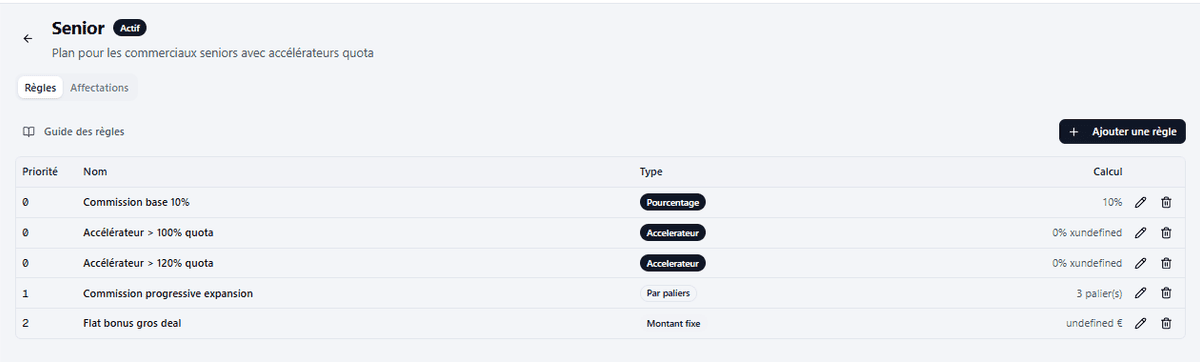
Configuration
Plans, rules and conditions stay centralised
Rates, flat amounts, tiers, accelerators, caps and conditions stay versioned in the product.
- 5 rule types available
- Flat or marginal tiers
- Per-rule or per-rep caps
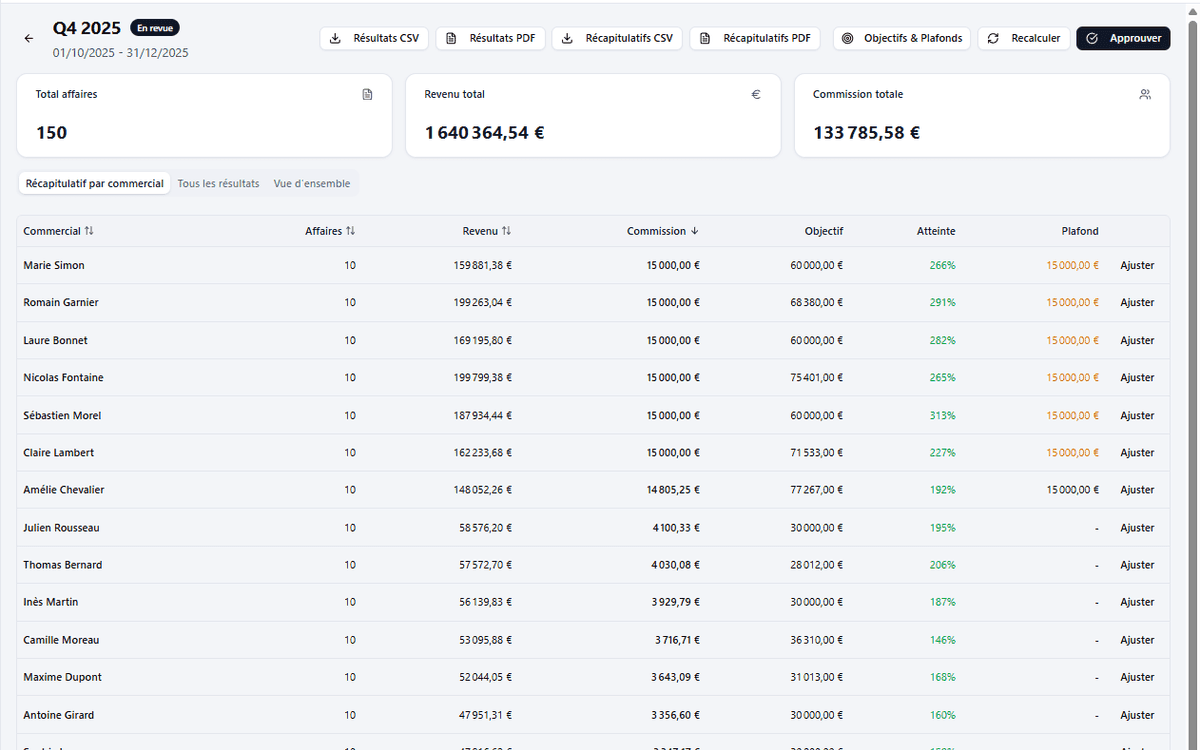
Review
The period becomes the review object, not the export
Exceptions, statuses and the final decision live on the period, with history Finance can actually review.
- Draft, calculating, review, approved, paid
- Audit log and recent activity
- Consistent outputs for Finance
Every commission is justifiable.
From the source deal through export, Commissia links the rule, the result and the period so Finance and Sales start from the same base.
- Go back to the source deal and the amount used
- See the applied rule, including tiers, accelerators, caps or splits
- Trace the final result back to the period and the export sent out
Deal -> rule -> commission -> export
Source deal
ACME Expansion - 24,000 EUR
CSV or CRM, with rep and currency.
Applied rule
Enterprise Plan - 8% + tier bonus
Rule type, conditions and detail retained.
Result
Commission calculated for Clara Martin
Caps, splits and adjustments included.
Period and output
January 2026 period - approved
Feeds Finance review, exports and portal.
What Finance can justify immediately
- Why this amount was calculated
- Which rule applied
- Who approved the period and when
For sales reps
- Understand each commission (deal + rule)
- Fewer disputes over amounts
- Clear history of periods and payouts
Pricing that scales with your team
Keep the structure simple while your commission process becomes more controlled.
To replace Excel cleanly
Go StarterFull automation and sales dashboards
Go GrowthFor larger organisations
Go ScaleAll prices exclude tax. Applicable VAT is added at checkout.
Frequently asked questions
Move the next close into a more reliable system
Start from a CSV, configure your plans and produce a justifiable period without rebuilding the spreadsheet.